
How to Caption Old Family Photos When Names or Dates Are Uncertain
Start with what you know, label what you suspect, and leave room for what you haven't discovered yet. A useful caption can name the people, place, approximate date, and source of the information. You don't need every answer before making a family photo book.
Perhaps you have a picture of your grandmother beside a car, an album full of unfamiliar faces, or a holiday photograph with nothing written on the back. The goal is to help the next person understand the picture without turning a family guess into a fact.
Here's a practical way to write captions for old family photos, including examples you can adapt.
Start with who, where, when, and what
Look for four details:
- Who: Names, relationships, and positions in a group picture.
- Where: A town, address, landmark, or simply “location unknown.”
- When: A documented date, an approximate year, or a date range.
- What: The occasion or activity, if known.
The US National Archives recommends adding basic information about people, events, places, and dates to digitized family materials so they can be identified later. You can use those same questions to shape your book captions. National Archives: Digitizing Family Papers and Photographs
For a group picture, identify people from left to right, or by row if that is clearer. “Grandad” may mean something different to each generation, so pair a relationship with a name when you know it: “Arthur Reed, Maya's grandfather.”
Keep the first sentence easy to scan. A longer memory can follow, but the reader should be able to find the basic details quickly.
Make uncertainty visible
Choose language that matches your evidence. These are suggested writing conventions, not formal archival categories:
| What you have | Useful wording | What it tells the reader |
|---|---|---|
| A dated inscription or another supporting record | “The back is labeled ‘June 1962.’” | Where the date came from. |
| A relative's recollection | “Identified by Aunt Rose as…” | Who supplied the identification. |
| A tentative identification | “Possibly…” or “Believed to be…” | The name remains uncertain. |
| An approximate date | “About 1950” or “1948–1952” | The date is an estimate. |
| Missing information | “Person unidentified; location unknown.” | The gap is still open. |
The Library of Congress's daguerreotype cataloging notes describe recording identification sources, keeping unconfirmed names in notes, and estimating dates from available evidence. That is a helpful model for family captions: show your reasoning without overstating certainty. Library of Congress: Cataloging the Daguerreotype Collection
“Circa” means approximately. If you use it, you can write “circa 1940 (approximately)” the first time, or simply use “about 1940” throughout the book.
Avoid choosing an exact year just because a hairstyle or car seems familiar. Treat visible details as leads to investigate. If you cannot explain the date estimate, leave the date unknown.
Five caption examples you can adapt
These examples are fictional and illustrate wording, not real family research.
1. You know the people and have a written date
Evelyn and Arthur Reed outside their home in York. The back of the photograph is labeled “June 1962.”
The caption preserves both the date and its source. It doesn't imply that the inscription has been independently checked.
2. A relative remembers the occasion
Family picnic near Ottawa, probably summer 1974. Aunt Rose recalls that this was the gathering before the family moved house.
The memory gives the photograph meaning while “probably” keeps the timing open.
3. One person is still unidentified
Left to right: Daniel Brooks, an unidentified woman, and his sister Nora. Location and date unknown.
You don't have to omit the photograph because one name is missing. A clear position makes future identification easier.
4. The family disagrees about a name
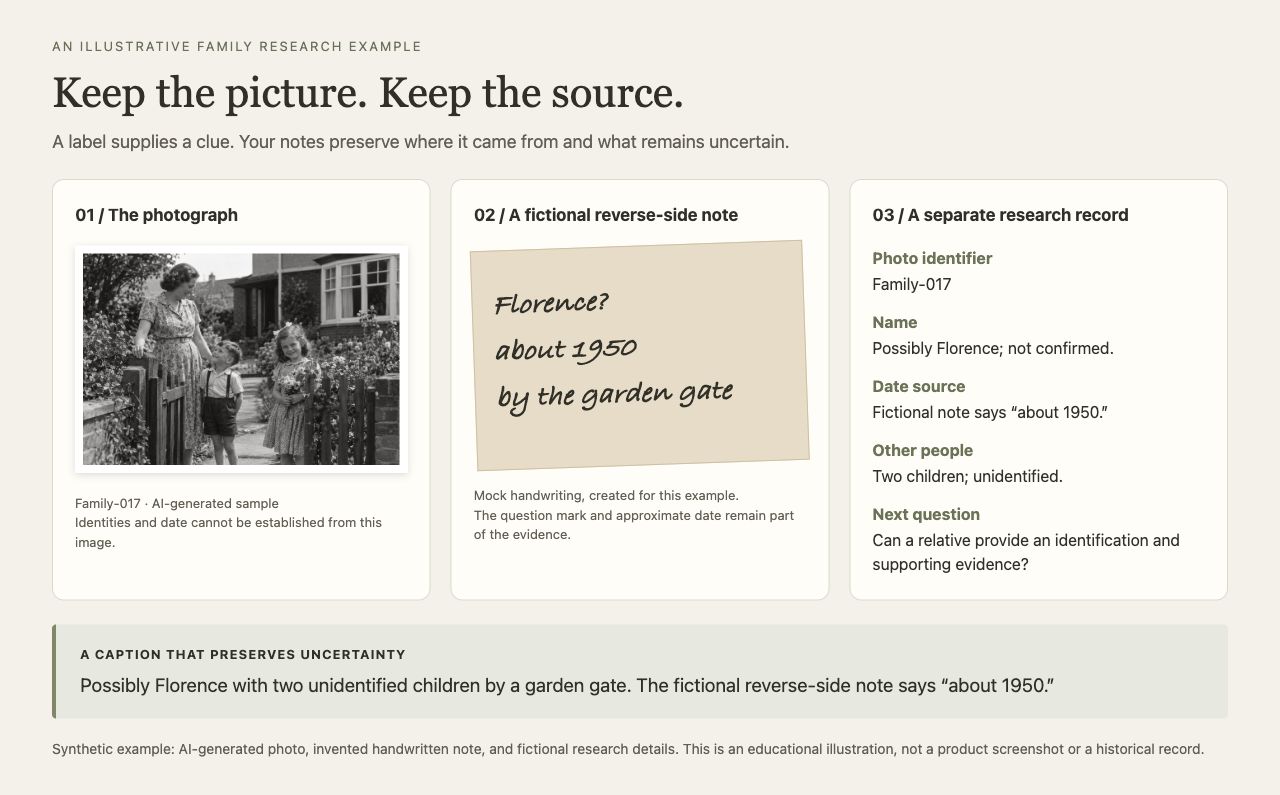
Woman standing beside the garden gate, possibly Florence Reed. Rose remembers her as Florence; Peter believes she may be Florence's sister, Edith.
For a shorter printed caption, use “Possibly Florence or Edith Reed; identification unresolved.” Keep the fuller account in your research notes.
5. You have a story but no reliable date
Arthur repairing a bicycle in the back garden. Maya remembers him teaching the grandchildren how to patch a puncture. Photograph undated.
A meaningful caption doesn't always need a year. A clearly attributed memory can add warmth without filling in missing facts.
Ask relatives questions that leave room for their answers
Show the photograph before suggesting a name. Try:
- “Do you recognize anyone here?”
- “What do you remember about this place?”
- “What makes you think it was that year?”
- “Is there another photograph or document we could compare it with?”
Write down who answered, when you spoke, and whether they sounded certain. If two people disagree, preserve both accounts while you investigate.
Also photograph or scan any writing on the back, and record where the picture came from. An old label is useful evidence, but it can contain mistakes. The Library of Congress has documented historical photographs with conflicting original captions that required further research to resolve. Library of Congress: Beware of Photos Bearing False Captions
Copy this family photo caption template
[Names or description of people], [place or “location unknown”], [date, approximate date, or “undated”]. [Occasion or brief memory]. [Source or uncertainty, when relevant].
Use only the parts you have. For example:
Nora Brooks with two unidentified children, location unknown, about 1950. Date estimated from the surrounding dated photographs in the family album.
Keep detailed research in a separate notes document. Give each image an identifier in your own files, such as “Family-017,” and use the same identifier in the notes. That lets you retain competing explanations without crowding the printed page. This is an organizing suggestion, not an automatic PhotoBook.page feature.
Turn the captions into a family history photo book
Begin with a manageable group: one branch of the family, one home, or one decade. Arrange the photographs in an order that makes sense, then add captions that help a reader follow the people and places.
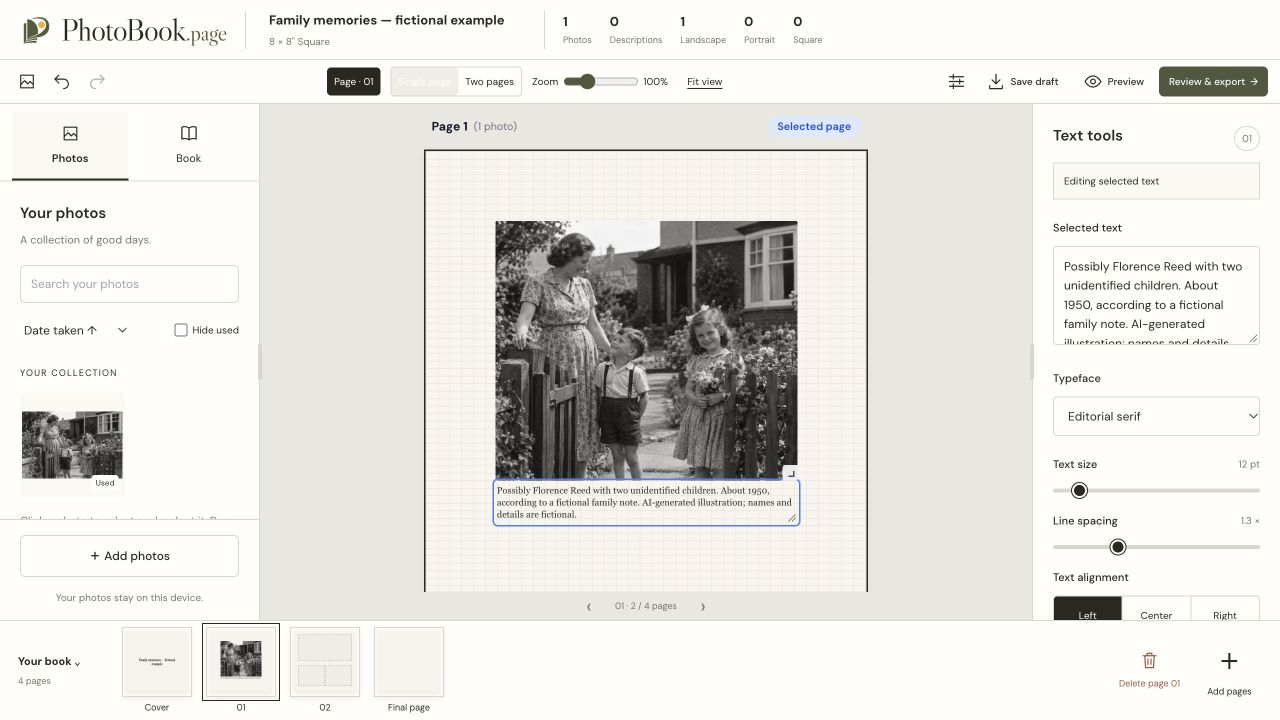
With PhotoBook.page, you can import photos, edit captions and layouts, save a portable draft file, and export a PDF. Photos are processed locally in your browser. You supply the family identifications and stories; the editor doesn't establish who is in an old photograph.
For layout ideas, see making a photo book with text. If you already wrote individual photo descriptions in Google Photos, follow the Google Photos to photo book guide to keep photos and their matching Google Takeout JSON files together. Album text and shared-album comments are separate from individual photo descriptions; see the differences between those text types before relying on a transfer.
Save your draft so you can revise captions when new information arrives. Review the exported PDF for readable text and correct names before sharing it. Keep your original photographs and research notes too: a finished book is one way to share the story, not a replacement for the evidence behind it.
Start your family photo book with a few photographs and the details you already know. An honest “not yet identified” can be the beginning of the next family conversation.